Apple Launches HomeView Smart Display with iPhone-Centric Setup
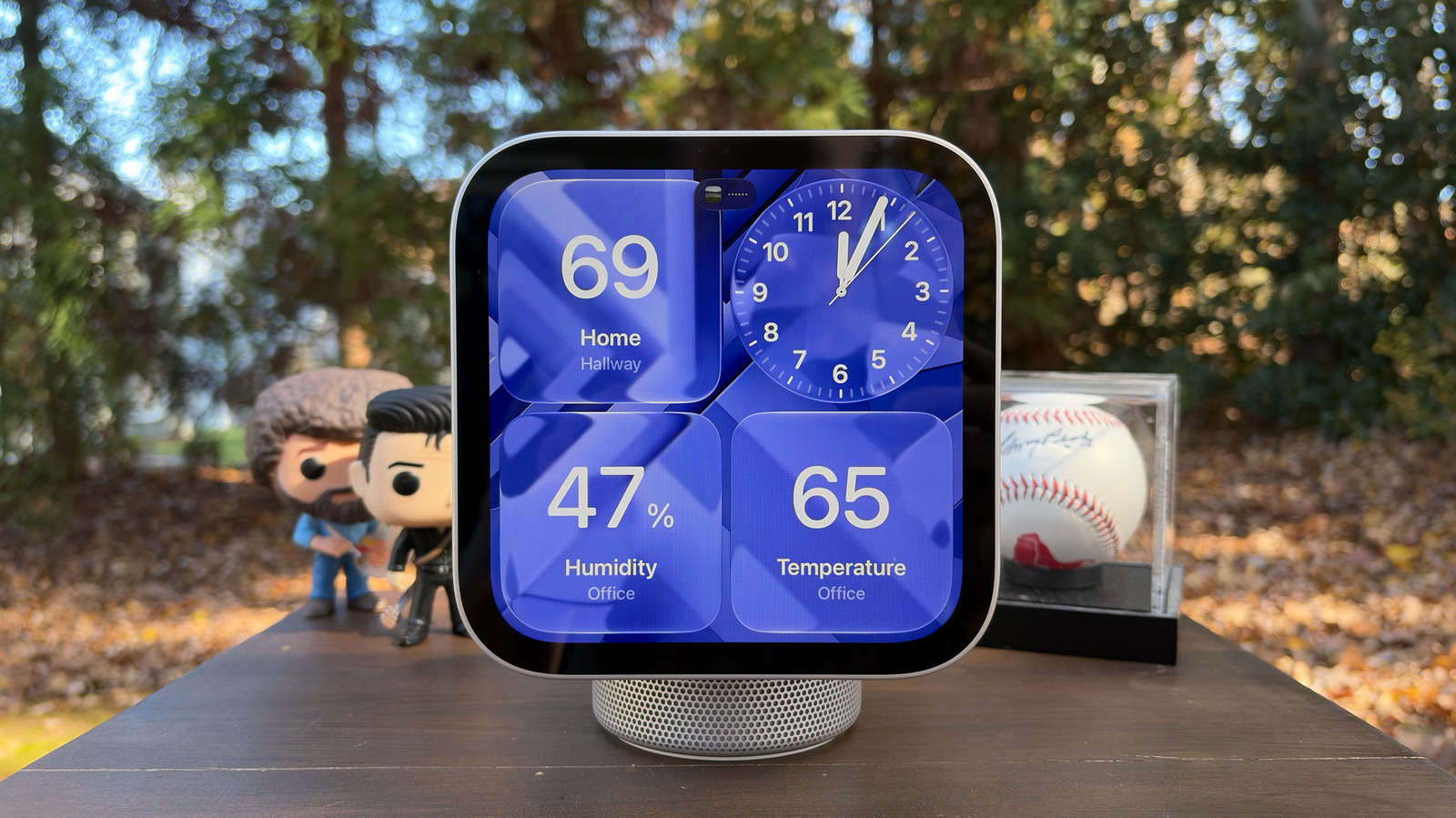
Apple has introduced the HomeView smart display, a new device that mirrors iPhone and iPad apps through a simplified, proximity-based pairing process.
 🏠Home & Kitchen
Photo: engadget.com
Key points
- Requires iOS 27.2 or iPadOS 27.2 and Apple Intelligence.
- Mirrors iPhone/iPad apps instead of running standalone software.
- Supports up to six users with individual Face and Voice Recognition.
The new Apple HomeView smart display has officially launched, offering a streamlined setup experience that relies on proximity to an iPhone or iPad. Much like Apple’s CarPlay, the device does not run standalone apps but instead mirrors compatible software from a paired mobile device. To get started, users must have an iPhone running iOS 27.2 or an iPad with iPadOS 27.2, along with active Apple Intelligence features to leverage the next-generation Siri assistant.
Pairing is designed to be intuitive: simply holding an unlocked iPhone or iPad near a powered-on HomeView triggers a setup card, similar to the process for connecting AirPods. For those who prefer manual configuration, the Home app can be used to add the device to a household. Once connected, the system prompts users to configure Face and Voice Recognition, which are essential for displaying personalized content like messages or calendar events while maintaining user privacy.
Before you buy: Ensure your iPhone or iPad is updated to the required iOS 27.2 or iPadOS 27.2 software, as the device will not function without the latest operating system and Apple Intelligence compatibility.
The HomeView is designed for shared environments, supporting up to six distinct users. It verifies identity through facial and voice authentication, ensuring that sensitive information remains restricted to the appropriate household member. During the final configuration steps, the device syncs Wi-Fi network settings and Siri preferences directly from the host iPhone to ensure a consistent user experience across the Apple ecosystem.
Source engadget.com — engadget.com/2318610/easy-apple-homeview-setup-with-iphone/ ↗
Read next
 🛍️Sales Events
Anker MagStand Qi2 Wireless Charger Hits $90 All-Time Low in Black Friday Sales
Anker's MagStand 25W wireless charging station drops to $90 at Amazon, matching its lowest price ever, while a wave of Black Friday deals covers power banks, travel charg…
 🛍️Sales Events
Black Friday Laptop Deals: Lenovo, Best Buy, and Walmart Cut Prices on ThinkBook, Yoga, and Gaming Models
Major retailers have launched Black Friday doorbuster sales on laptops, with Lenovo's ThinkBook 14x dropping to $699 and Best Buy offering a Yoga 7i 2-in-1 for $649.99.
 🧭Buying Guides
Essential Gear for Frequent Travelers: A Gift Guide
Selecting the right travel accessories can significantly reduce the stress of trip planning and packing. This guide highlights functional items designed to streamline the…
 🧭Buying Guides
Essential Guide to Choosing an EPA-Certified Wood Stove
Upgrading to a modern, EPA-certified wood stove can improve home heating efficiency while reducing particulate pollution compared to older, uncertified models.
 👟Fashion & Beauty
Black Friday Fashion and Travel Savings: J.Crew Factory, Nordstrom Rack, and More
Retailers are rolling out significant pre-Black Friday discounts on apparel and travel gear, featuring clearance markdowns and promotional codes for new customers.
 🧭Buying Guides
Black Friday Kitchenware Deals: Navigating Early Holiday Savings
Major retailers are launching extensive Black Friday kitchenware sales, featuring significant discounts on premium appliances, cookware sets, and essential accessories. S…